Translate Us iPhone Text Translation
iPhone translator picking the wrong language? Check the source first
Short answer: Keep the original text, confirm its source language and check the destination separately. A known-source dictionary example shows why the same spelling can lead to different meanings.
Check the original source and destination separately, keep the real message intact, and use a dictionary example to distinguish the same spelling in two languages.

Published by Clara Publisher
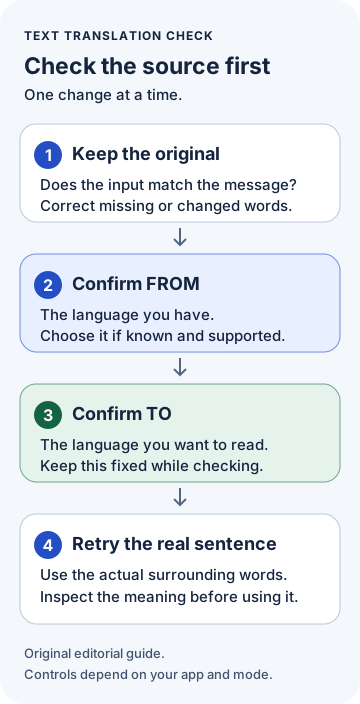
For a wrong-language result, check the original text and the language assigned to it before changing your iPhone's system language. In a Translate Us text task, compare the displayed language direction with the source you have and the language you want to read. If explicit source selection is offered and you know the source, choose that language before trying the original sentence again.
A source-language mistake and an unexpected destination need different checks. The word Gift makes the distinction concrete: as a German source word it can mean poison in English; the English word gift is a different starting point.
German · Illustrative dictionary workflow
The source language changes the meaning
Dictionary-backed editorial illustration, not captured Translate Us output or a detection test. Confirm the source and use its real sentence when available.
-
Start with the known source
German input
Gift
-
Check the dictionary meaning
Dictionary reading and meaning
poison
-
Confirm direction before retrying
For the German word, check German → English. English gift describes a different word. Use the actual surrounding sentence when available.
Start with the source: Gift or gift?
Suppose the original is German and you want English. German Gift has poison as a dictionary meaning. English gift, meaning a thing given, can be translated into German as Geschenk. These are different source words even though the spelling looks familiar.
For the German word, the direction to check is German to English. Changing only the output language does not identify which source you meant. The example below was written to illustrate that decision; it is not an app error report or captured translation.
Example
- Known German source
- Gift
- Direction
- German → English
- Dictionary meaning
- poison
- Different English source
- gift, meaning a thing given
- Other direction and meaning
- English → German: Geschenk
- Useful decision
- Confirm the language the original came from before retrying it. Use the real sentence if one is available.
Check the text and direction in Translate Us
Translate Us lists typed-text translation, and its official Text Translator image shows separate language labels. Start with that text task when you have an original message to inspect. Check the languages displayed in your current app rather than assuming that a familiar-looking word has been assigned the right source.
Use the available language controls for your pair. If explicit source selection is offered, choose the source you know. Keep the destination fixed while checking it.
- Keep the original message visible and compare it with the entered text.
- Confirm which language the sender used. Do not infer it from one familiar spelling.
- Check the displayed source and destination, using explicit source selection when offered.
- Try the actual complete sentence and compare its meaning with the original.
Change the setting that matches the problem
From means the language you have. To means the language you want to read. Keep those checks separate from the words themselves. Changing several inputs at once makes it harder to tell which detail was wrong.
- Entered text differs from the original: correct missing or changed characters first.
- Text matches but the source label is wrong: confirm the original language, then choose it if the app offers that choice.
- Source is right but the result is in an unexpected language: check the destination.
- Both labels are right but a word has an odd meaning: read its actual surrounding sentence and check which meaning fits.
Keep the real sentence, not an invented explanation
If the word came from a sentence, preserve that sentence. Do not add new wording merely to force the answer you expected. When the source language is unknown, ask the sender or preserve a longer passage from the same source for review.
For voice or photo input, compare any recognized text with the spoken or printed original first. A changed input is a separate problem from translating the right words in the wrong direction. The image guide linked below retains framing and retake instructions.
Try one known-source message
If you need a separate iPhone text workspace, view Translate Us in the App Store. Check the language pair and the controls offered in the current app, then use one complete message whose source you know. Keep the original beside the result so you can inspect the meaning before replying.
The Gift example is a vocabulary illustration, not a method for interpreting a real warning or label. If the original wording or language remains uncertain, keep that uncertainty visible and ask someone who can read the source.
Worked language checks
Keep the source with the word
The dictionary examples illustrate two meanings and directions. They are not captured translation results or a language-detection benchmark.
Known source: German.
Original word: Gift.
Direction: German → English.
Dictionary meaning: poison.
Check: Do not read it as the English word gift.
Known source: English. Original word: gift, meaning a thing given. Direction: English → German. Dictionary meaning: Geschenk. Check: This is a different source word, despite similar spelling.Original sentence: Keep the actual message. From: Confirm the language the sender used. To: Choose the language you want to read. Check: Do not invent surrounding words to force a preferred result.
Quick check
Before you translate
- Keep the original message available.
- Check whether the entered text matches it.
- Confirm the source language before changing the destination.
- Use explicit source selection when offered and the source is known.
- Retry the real complete sentence and inspect its meaning.
- Ask the sender when the original language or wording remains uncertain.
FAQ
Frequently asked questions
Should I change my iPhone's system language first?
Start with the source and destination in the translation task. A phone's interface language does not identify whether the original message is German, English or another language. This guide does not establish that changing system language fixes a particular app's detection.
What if I do not know the source language?
Keep the original and ask its sender, or investigate a longer passage from the same source. Treat a detected language label as something to check. Do not replace an unfamiliar language with one that merely looks similar, and do not invent surrounding text.
Why can one short word cause confusion?
The same spelling can have different meanings in different languages, as the Gift example shows. A complete sentence supplies context. This guide does not establish a universal character threshold or a Translate Us detection limit.
What if both language choices are right but the meaning is still wrong?
Check the original sentence and the uncertain word's meaning in context. A correct source label does not settle every vocabulary question. Ask the sender to clarify what the word refers to, then translate the clarified original while keeping the clarification separate.
Can Translate Us automatically detect every source language?
That has not been verified here. Its current listing advertises text translation, and its official marketing image shows language-direction labels. Neither establishes automatic detection for every language or mode. Check the current app's behavior for the pair you need.
Sources
Useful links
Take it with you
Try a short text you can check
View Translate Us on the App Store. Check your required pair and available language controls, then try one complete sentence beside its original.
Explore Translate Us