Translate Us iPhone Text Translation
Can you translate on an older iPhone without Apple Intelligence?
Short answer: Use a compatible standalone text translator for one complete message. Check the app installation floor and available language pair separately from Apple Intelligence hardware eligibility.
Separate app installation requirements from Apple Intelligence eligibility, then try one short typed message on a compatible iPhone.

Published by Clara Publisher
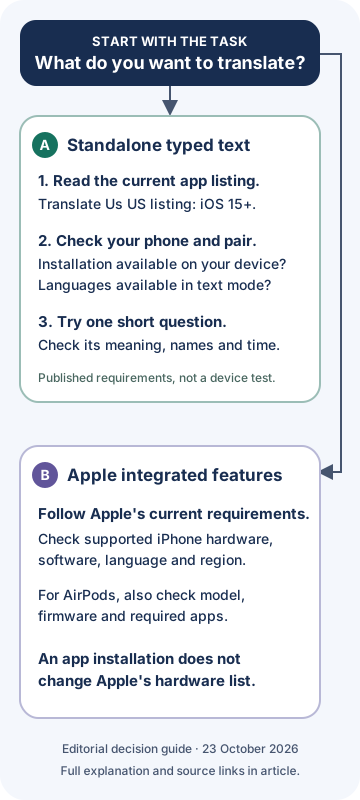
Yes, ordinary typed translation has different requirements from Apple Intelligence. On a compatible iPhone, Translate Us offers a text-translation workflow for a short message. Its current US App Store listing requires iOS 15.0 or later. Check installation availability on your phone and the language pair in text mode before starting.
Start with one complete question. The French-English example below shows the useful result to check: a request to move a meeting, with the morning time preserved. Apple Intelligence eligibility is a separate question from this standalone text task.
French → English · Illustrative workflow
Try one ordinary text task
Original French-English wording, not captured app output. Use the listed text workflow only when the current app and required pair are available on your phone.
-
Keep the complete question
French input
Pourrions-nous décaler notre réunion à 11 h 30 ?
-
Read the intended meaning
English translation
Could we move our meeting to 11:30 AM?
-
Check the request and time
It asks whether the meeting can move; it does not confirm a new time. Check the date and time zone in your real message.
Start with one complete meeting question
Suppose a contact sends the French question below and you want to read it in English. Keep the complete sentence, including its question mark and time. The wording is an original editorial example; it is not a message from a real contact or a recorded app result.
The useful meaning is a request, not a confirmed appointment. If the real conversation does not identify the date or time zone, ask the sender instead of supplying one yourself.
Example
- French input
- Pourrions-nous décaler notre réunion à 11 h 30 ?
- Illustrative English meaning
- Could we move our meeting to 11:30 AM?
- What to check
- The sentence asks whether a meeting can move. It does not confirm a new time. Keep 11:30 in the morning and the question intact.
- Basis
- Constructed wording, not captured Translate Us output or an accuracy measurement.
Use a text task on the iPhone you own
Open the current Translate Us listing using the download link below. If the app is available for your iPhone, use its listed text-translation workflow. Check that the source and destination languages shown match your task. For this example, use French to English only if that pair is available in your text mode.
Enter the complete original question. Read the result beside the source and inspect the request and time before replying. Use a short sentence you can verify before moving to a longer exchange.
- Check the current listing and whether installation is available on your iPhone.
- In the offered text workflow, confirm the source language and the language you want to read.
- Enter one complete question, keeping names and times unchanged.
- Compare the result with the intended question before using it in your conversation.
Check app requirements and Apple Intelligence separately
For a standalone text translator, the current app listing is the installation starting point. Translate Us lists iOS 15.0 or later. Your phone still needs to be eligible to install the current app, and the specific language pair must be available for the text task.
Apple Intelligence has a separate eligible-hardware list. Its integrated Live Translation features have their own software, language and availability requirements. Installing a standalone translator does not change those requirements.
- A typed message in Translate Us: check app installation availability and the exact text-language pair.
- An Apple integrated feature: check the eligible iPhone and that feature's software, language and region requirements.
- Apple AirPods Live Translation: also check compatible AirPods, firmware and required apps.
- A third-party phone-call or AirPods integration: require evidence for that exact feature instead of inferring it from a general voice-translation description.
What an iPhone 14 Pro example tells you
Consider a hypothetical iPhone 14 Pro running iOS 18. Its installed software is above Translate Us's published iOS 15 installation floor. That passes the published version comparison, while actual App Store availability and the text-language pair still need checking on the phone.
The same model is absent from Apple's current eligible iPhone list for Apple Intelligence. This shows why the two checks differ. It is a reading of published requirements, not a hands-on test on that device.
Example
- Phone profile
- Hypothetical iPhone 14 Pro with iOS 18.
- App version-floor check
- iOS 18 is above the listed iOS 15 minimum; confirm actual installation availability.
- Apple Intelligence check
- The iPhone 14 Pro model is not listed as eligible.
- Next useful task
- If the app and text pair are available, try one complete typed question and inspect its meaning.
Continue with a message you can check
If you need an ordinary text workspace, check Translate Us in the App Store. Replace the example with your own complete question and keep its names, date and time beside the result. The first useful outcome is wording you understand and can refer back to.
An installation requirement does not establish every mode, language pair or translation result on a particular phone. Keep a system-integration request separate from the typed-message task.
Worked decisions
Keep the task and requirements together
These are editorial decision examples and constructed wording. They are not captured app results, a real meeting request or a test of older-device performance.
French input: Pourrions-nous décaler notre réunion à 11 h 30 ?
Illustrative English: Could we move our meeting to 11:30 AM?
Check: This is a request to change a meeting, not a confirmed change.
Your real source: Keep the complete question and its time. Check: Does the result preserve the question, names and morning or evening meaning? Follow up: Ask for a missing date or time zone instead of inventing it.Phone check: Note the iPhone model and installed iOS separately. Task check: A standalone text translation and Apple's integrated Live Translation have different requirements.
Quick check
Before you translate
- Name the task: a typed message or a specific system integration.
- Check the iPhone model and installed iOS version separately.
- Read the current App Store requirements on your own phone.
- Confirm the language pair in the mode you need.
- Check one short question against its original meaning, names and time.
- Use Apple's feature requirements for Apple Intelligence and AirPods Live Translation.
FAQ
Frequently asked questions
Does every translation app require Apple Intelligence?
No. Standalone apps have their own requirements. Translate Us's current US listing advertises text translation and requires iOS 15.0 or later. Check installation availability and the text-language pair on your own phone.
Will updating iOS make an iPhone 14 Pro eligible for Apple Intelligence?
An iOS update does not change the iPhone model. Apple's current eligible hardware list does not include iPhone 14 Pro. Check the requirements for the particular feature instead of assuming that a newer iOS version supplies hardware eligibility.
Does meeting the minimum iOS version guarantee every translation mode works?
No. The version floor answers an installation question. It does not demonstrate language-pair availability, the behavior of other modes or translation quality on a particular device. Start with the typed-text task you plan to use.
Can installing Translate Us give an older phone Apple's AirPods Live Translation?
Installing a standalone translator does not change Apple's hardware eligibility. Apple documents separate requirements for AirPods Live Translation. This guide has not verified continuous AirPods listening, call translation or another system integration in Translate Us.
What if the App Store will not let me install the app?
Check the compatibility information shown on your phone, your iPhone model, the installed iOS version and the storefront listing. Do not assume that an older app version will be offered or that a software update changes every restriction. Choose a workflow whose current requirements your device meets.
Sources
Useful links
Take it with you
Translate one complete question on your iPhone
Check Translate Us compatibility and available text languages, then try one short message with its original meaning and time beside the result.
Explore Translate Us